
Application collectors
Shaka Media Player
v2.27.0 • For the Javascript Collector
The Shaka Media Player Extension is a configuration option for the Javascript Collector by Datazoom that makes the following additional data points automatically collectable in real time.
Integration Instructions
Datazoom provides plugins for data collection through our Beacon Services. Integrate the Shaka Player plugin into your web application with the following snippet: Insert this JS line into your HTML Replace the This inserts Datazoom's data collection SDK into the page. The Shaka Player plugin can be integrated into your HTML along with additional parameters. For example, the Normally the CMCD data, if enabled, are transmitted to CDN as query strings on each of the request URLs. By specifying The CDN must be configured to support CORS preflight requests, in order to allow CMCD headers. The Activate data collection by passing player instance only. for example: Activate data collection by passing player instance and controls instance for example: Once the Datazoom context object is initialized, normally the collector will start content session automatically when it detects the intent to start playback, based on listener-events from the player. However, in cases where this auto detection of content session start being inaccurate (for example, with Shaka player the HTML5 video If the data collection must be stopped for any reason, for example after the destruction of the corresponding player instance, invoke the We have made it convenient to manage your Shaka Collector integration by providing NPM (Node Package Manager) support. Please see installation details here. Shaka Player API Doc : https://shaka-player-demo.appspot.com/docs/api/tutorial-welcome.html Plugin Integration
1 <script src='https://platform.datazoom.io/beacon/v1/config?configuration_id=CONFIG_ID'></script>CONFIG_ID value with the collector configuration ID.Additional Parameters
cmcd_mode parameter overrides the mode of transmitting CMCD data to CDN:1<script src='https://platform.datazoom.io/beacon/v1/config?configuration_id=CONFIG_ID&cmcd_mode=header'></script>header for the cmcd_mode parameter as above, the same data are transmitted to CDN as HTTP headers instead.CONFIG_ID value above should be replaced with the collector configuration ID as usual.Activate Data Collection for a Shaka Player
1context = datazoom.createContext(player);1<!DOCTYPE html>2<html lang="en">34<head>5 <title>Shaka Player Test Video</title>6 <link rel="stylesheet" href="https://ajax.googleapis.com/ajax/libs/shaka-player/3.1.0/controls.css">7 <!-- THE SHAKA PLAYER CDN -->8 <script src="https://ajax.googleapis.com/ajax/libs/shaka-player/3.1.0/shaka-player.ui.js"></script>9 <!-- THE DATAZOOM BEACON SCRIPT -->10 <script src="https://platform.datazoom.io/beacon/v1/config?configuration_id=CONFIG_ID"></script>11</head>1213<body>14 <p>15 This example demonstrates the basic use of the Datazoom SDK with the SHAKA16 player17 </p>18 <div data-shaka-player-container style="max-width: 40em" data-shaka-player-cast-receiver-id="1BA79154">19 <video data-shaka-player id="video" style="width: 100%; height: 100%"></video>20 </div>21 <script>22 async function initPlayer() {23 var video_url = "https://storage.googleapis.com/shaka-demo-assets/angel-one/dash.mpd"24 const video = document.getElementById("video");25 var ui = video["ui"];;26 // Create a Controls instance.27 var controls = ui.getControls();28 // Create a Player instance.29 var player = controls.getPlayer();30 window.player = player;31 //Activates data collection32 datazoom.createContext(player);33 try {34 await player.load(video_url);35 // This runs if the asynchronous load is successful.36 console.log("The video has now been loaded!");37 } catch (e) {38 // onError is executed if the asynchronous load fails.39 onError(e);40 }41 }4243 function initApp() {44 // Install built-in polyfills to patch browser incompatibilities.45 shaka.polyfill.installAll();46 // Check to see if the browser supports the basic APIs Shaka needs.47 if (shaka.Player.isBrowserSupported()) {48 // Everything looks good!49 document.addEventListener('shaka-ui-loaded', initPlayer);50 } else {51 // This browser does not have the minimum set of APIs we need.52 console.error("Browser not supported!");53 }54 }5556 function onErrorEvent(event) {57 // Extract the shaka.util.Error object from the event.58 onError(event.detail);59 }6061 function onError(error) {62 // Log the error.63 console.log("Error code", error.code, "object", error);64 }65 initApp();66 </script>67</body>6869</html>1context = datazoom.createContext({2 player: my_player,3 controls: my_controls4});1<!DOCTYPE html>2<html lang="en">34<head>5 <title>Shaka Player Test Video</title>6 <link rel="stylesheet" href="https://ajax.googleapis.com/ajax/libs/shaka-player/3.1.0/controls.css">7 <!-- THE SHAKA PLAYER CDN -->8 <script src="https://ajax.googleapis.com/ajax/libs/shaka-player/3.1.0/shaka-player.ui.js"></script>9 <!-- THE DATAZOOM BEACON SCRIPT -->10 <script src="https://platform.datazoom.io/beacon/v1/config?configuration_id=CONFIG_ID"></script>1112</head>1314<body>15 <p>16 This example demonstrates the basic use of the Datazoom SDK with the SHAKA17 player18 </p>19 <div data-shaka-player-container style="max-width: 40em" data-shaka-player-cast-receiver-id="1BA79154">20 <video data-shaka-player id="video" style="width: 100%; height: 100%"></video>21 </div>22 <script>23 async function initPlayer() {24 const video = document.getElementById("video");25 var video_url = "https://storage.googleapis.com/shaka-demo-assets/angel-one/dash.mpd"26 var ui = video["ui"];27 // Create a Controls instance.28 var my_controls = ui.getControls();29 // Create a Player instance.30 var my_player = my_controls.getPlayer();31 window.my_player = my_player;32 datazoom.createContext({33 player: my_player,34 controls: my_controls35 });36 try {37 await my_player.load(video_url);38 // This runs if the asynchronous load is successful.39 console.log("The video has now been loaded!");40 } catch (e) {41 // onError is executed if the asynchronous load fails.42 onError(e);43 }44 }4546 function initApp() {47 // Install built-in polyfills to patch browser incompatibilities.48 shaka.polyfill.installAll();49 // Check to see if the browser supports the basic APIs Shaka needs.50 if (shaka.Player.isBrowserSupported()) {51 // Everything looks good!52 document.addEventListener('shaka-ui-loaded', initPlayer);53 } else {54 // This browser does not have the minimum set of APIs we need.55 console.error("Browser not supported!");56 }57 }5859 function onErrorEvent(event) {60 // Extract the shaka.util.Error object from the event.61 onError(event.detail);62 }6364 function onError(error) {65 // Log the error.66 console.log("Error code", error.code, "object", error);67 }68 initApp();69 </script>70</body>7172</html>Start Content Session Explicitly
play listener-events are fired after finishing loading of media data, which results in late detection of the playback intent), the Datazoom context object provides the startContentSession() method that the application can call to explicitly start a content session in a way tailored for the application. For example:1// If the video should auto play2function onPageLoad() {3 datazoom_context.startContentSession();4 ...5}67// If the video doesn't auto play8function onPlaybackButtonClick() {9 datazoom_context.startContentSession();10 ...11}Stop Data Collection
destroy() method of the Datazoom context object as in the following example:1if (my_player) {2 my_player.destroy();3 my_player = null;4}56if (datazoom_context) {7 datazoom_context.destroy();8 datazoom_context = null;9}NPM (Node Package Manager)
References:
CMCD Support
Datazoom provides two discrete settings that control CMCD data collection, one for a specific player event, “Media Object Request”, and one for the corresponding CDN log response.
Player Collector configuration options
Use this option to enable your configured CDN to collect and return CMCD data, contained in the CMCD node of the log line JSON
Off - no CMCD keys are passed
Lite - only the CMCD keys Session ID (sid) and Request ID (rid) are passed to the CDN via query parameter or request header with every “Media Object Request”.
Full - the full set of keys specified by the CMCD standard are passed to the CDN via query parameter or request header with every “Media Object Request”

Bitmovin and JW Player support only the “Lite” setting above
Data Pipe configuration options
Select the CMCD data points you wish to be included in content requests.
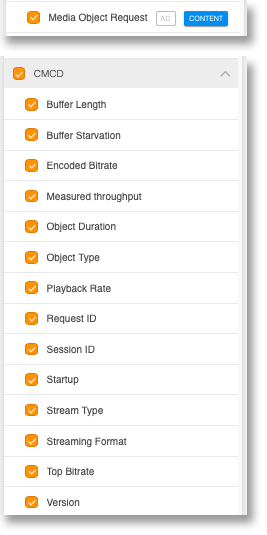
Media Object Request - The video player will emit an event called “media_object_request” that will contain the selected CMCD keys below
CMCD keys - Select the CMCD keys you wish to have included with each Media Object Request
Ad Frameworks Extensions
If your Javascript application has a media player with an ad framework, Datazoom’s Javascript Collector with a Shaka Media Player can be extended with the following ad framework extensions.
Supported Features
Supported Data Points
Events
Discrete occurrences driven by user interactions or system actions
-
Audio Track Changed

-
Buffer End
-
Buffer Start
-
Cast End
-
Cast Start
-
Cast Transfer
-
Error
-
Exit Fullscreen
-
Fullscreen
-
Heartbeat
-
Media Loaded
-
Media Object Request
-
Media Request
-
Milestone
-
Mute
-
Pause
-
Playback Complete
-
Playback Start
-
Player Ready
-
Playing
-
Qualified View
-
Rendition Change
-
Resize
-
Resume
-
Seek End
-
Seek Start
-
Stall End
-
Stall Start
-
Stop
-
Subtitle Change
-
Unmute
- Volume Change
Metadata
Player
CMCD
Attributes
User
Fluxdata
Metrics measuring changing parameters over time
-
Audio Track
-
Bandwidth
-
Buffer Duration (Content Session)
-
Buffer Length
-
Buffer Start Recency (Content Session)
-
Content Buffer Duration (Content Session)
-
Content Buffer Start Recency (Content Session)
-
Content Error Count (App Session)
-
Content Media Request Count (App Session)
-
Content Media Request Recency (Content Session)
-
Content Milestone Recency (Content Session)
-
Content Pause Count (App Session)
-
Content Pause Duration (Content Session)
-
Content Playback Duration (Content Session)
-
Content Playback Start Count (App Session)
-
Content Playback Start Recency (Content Session)
-
Content Seek Count (App Session)
-
Content Session Start Timestamp
-
Content Stall Count (Content Session)
-
Content Stall Duration (Content Session)
-
Content Stall Start Recency (Content Session)
-
Content Startup Duration (Content Session)
-
Error Count (App Session)
-
Heartbeat Recency (Content Session)
-
Pause Duration (Content Session)
-
Pause Recency (Content Session)
-
Playback Duration (Content Session)
-
Playback Rate
-
Player State
-
Player Viewable
-
Player Viewable Percent
-
Playhead Position
-
Playhead Position - Program Date Time
-
Promo Playback Duration (Content Session)
-
Rendition Audio Bitrate
-
Rendition Change Recency (Content Session)
-
Rendition Height
-
Rendition Name
-
Rendition Video Bitrate
-
Rendition Width
-
Seek Start Recency (Content Session)
-
Stall Count (Content Session)
-
Stall Duration (Content Session)
-
Stall Start Recency (Content Session)
-
Startup Duration (Content Session)
-
Subtitle Track
- Volume